Category:Keypad
SCH
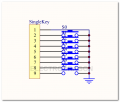
Kaypad SCH 01

Demo code
/* @file CustomKeypad.pde
|| @version 1.0
|| @author Alexander Brevig
|| @contact [email protected]
||
|| @description
|| | Demonstrates changing the keypad size and key values.
|| #
*/
#include <Keypad.h>

const byte ROWS = 4; //four rows
const byte COLS = 4; //four columns
//define the cymbols on the buttons of the keypads
char hexaKeys[ROWS][COLS] = {
  {'0','1','2','3'},
  {'4','5','6','7'},
  {'8','9','A','B'},
  {'C','D','E','F'}
};
byte rowPins[ROWS] = {7, 6, 5, 4}; //connect to the row pinouts of the keypad
byte colPins[COLS] = {11, 10, 9, 8}; //connect to the column pinouts of the keypad

//initialize an instance of class NewKeypad
Keypad customKeypad = Keypad( makeKeymap(hexaKeys), rowPins, colPins, ROWS, COLS);

void setup(){
  Serial.begin(9600);
}

void loop(){
  char customKey = customKeypad.getKey();

  if (customKey){
    Serial.println(customKey);
  }
}
Updated Demo Code 2013-05-24
We have tested with library on 4X4 keypad, but there is some thing need to change.Please follow the steps.
- Download this library, and it's refer to this arduino page.
- Use the example called "custom keypad" in the menu
- switched the pins, pin 1 connect to the keypad will make one row or one column not work out. so let's change all the wirings from 1-4 and 5-7 to 5-7 and 8-11.
- Always try to avoid pin 1, in other keypad version.
Pin Definitions
VCC Row 1, 2, 3, 4
NC Column 1, 2, 3, 4
Output high TTL signal when either row or column buttons are pressed.