Difference between revisions of "Category:Keypad"
| Line 55: | Line 55: | ||
* Always try to avoid pin 1, in other keypad version. | * Always try to avoid pin 1, in other keypad version. | ||
=== Pin Definitions === | === Pin Definitions === | ||
VCC Row 1, 2, 3, 4<br /> | VCC Row 1, 2, 3, 4<br /> | ||
Revision as of 17:11, 18 January 2026
SCH
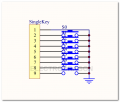
Kaypad SCH 01

Demo code
/* @file CustomKeypad.pde
|| @version 1.0
|| @author Alexander Brevig
|| @contact [email protected]
||
|| @description
|| | Demonstrates changing the keypad size and key values.
|| #
*/
#include <Keypad.h>

const byte ROWS = 4; //four rows
const byte COLS = 4; //four columns
//define the cymbols on the buttons of the keypads
char hexaKeys[ROWS][COLS] = {
  {'0','1','2','3'},
  {'4','5','6','7'},
  {'8','9','A','B'},
  {'C','D','E','F'}
};
byte rowPins[ROWS] = {7, 6, 5, 4}; //connect to the row pinouts of the keypad
byte colPins[COLS] = {11, 10, 9, 8}; //connect to the column pinouts of the keypad

//initialize an instance of class NewKeypad
Keypad customKeypad = Keypad( makeKeymap(hexaKeys), rowPins, colPins, ROWS, COLS);

void setup(){
  Serial.begin(9600);
}

void loop(){
  char customKey = customKeypad.getKey();

  if (customKey){
    Serial.println(customKey);
  }
}
Updated Demo Code 2013-05-24
We have tested with library on 4X4 keypad, but there is some thing need to change.Please follow the steps.
- Download this library, and it's refer to this arduino page.
- Use the example called "custom keypad" in the menu
- switched the pins, pin 1 connect to the keypad will make one row or one column not work out. so let's change all the wirings from 1-4 and 5-7 to 5-7 and 8-11.
- Always try to avoid pin 1, in other keypad version.
Pin Definitions
VCC Row 1, 2, 3, 4
NC Column 1, 2, 3, 4
Output high TTL signal when either row or column buttons are pressed.
Demo code
- Same demo code for arduino can be found here.
#include<reg51.h>
#define uchar unsigned char
#define uint unsigned int
//sbit key1=P3^4;
//sbit key2=P3^5;
//sbit key3=P3^6;
//sbit key4=P3^7;
uchar code table[]={
0x3f,0x06,0x5b,0x4f,
0x66,0x6d,0x7d,0x07,
0x7f,0x6f,0x77,0x7c,
0x39,0x5e,0x79,0x71,
};
uchar num,temp;
void delay (uint z)
{
	uint x,y;
	for(x=z;x>0;x--)
		for(y=110;y>0;y--);
}
void main ()
{
	num=1;
	while(1)
	{
		P3=0xfe;// low TTL on first row
		temp=P3;//扫面P3口的数据,送给temp
		temp=temp&0xf0;//扫描是否有按键按下,如果有则temp的高四位肯定有一位是0.
		while(temp!=0xf0)
		{
			delay(5);//消抖
			temp=P3;//再次读P3口的数据
			temp=temp&0xf0;
			while(temp!=0xf0)
			{
				temp=P3;
				switch(temp)
			    {
				case 0xee: num=1;break;
				case 0xde: num=2;break;
				case 0xbe: num=3;break;
				case 0x7e: num=4;break;
				default: break;
			    }
				while(temp!=0xf0)
				{
					temp=P3;
					temp=temp&0xf0;
				}
			}
		}
	 	P1=table[num-1];


		P3=0xfd;//将第二行电平拉低
		temp=P3;//扫面P3口的数据,送给temp
		temp=temp&0xf0;//扫描是否有按键按下,如果有则temp的高四位肯定有一位是0.
		while(temp!=0xf0)
		{
			delay(5);//消抖
			temp=P3;//再次读P3口的数据
			temp=temp&0xf0;
			while(temp!=0xf0)
			{
				temp=P3;
				switch(temp)
			    {
				case 0xed: num=5;break;
				case 0xdd: num=6;break;
				case 0xbd: num=7;break;
				case 0x7d: num=8;break;
				default: break;
			    }
				while(temp!=0xf0)
					{
						temp=P3;
						temp=temp&0xf0;
					}
			}
		}
	 P1=table[num-1];


		P3=0xfb;//将第三行电平拉低
		temp=P3;//扫面P3口的数据,送给temp
		temp=temp&0xf0;//扫描是否有按键按下,如果有则temp的高四位肯定有一位是0.
		while(temp!=0xf0)
		{
			delay(5);//消抖
			temp=P3;//再次读P3口的数据
			temp=temp&0xf0;
			while(temp!=0xf0)
			{
				temp=P3;
				switch(temp)
			    {
				case 0xeb: num=9;break;
				case 0xdb: num=10;break;
				case 0xbb: num=11;break;
				case 0x7b: num=12;break;
				default: break;
			    }
				while(temp!=0xf0)
						{
							temp=P3;
							temp=temp&0xf0;
				         }
			}
		}
	 P1=table[num-1];


		P3=0xf7;//将第四行电平拉低
		temp=P3;//扫面P3口的数据,送给temp
		temp=temp&0xf0;//扫描是否有按键按下,如果有则temp的高四位肯定有一位是0.
		while(temp!=0xf0)
		{
			delay(5);//消抖
			temp=P3;//再次读P3口的数据
			temp=temp&0xf0;
			while(temp!=0xf0)
			{
				temp=P3;
				switch(temp)
			    {
				case 0xe7: num=13;break;
				case 0xd7: num=14;break;
				case 0xb7: num=15;break;
				case 0x77: num=16;break;
				default: break;
			    }
				while(temp!=0xf0)
						{
							temp=P3;
							temp=temp&0xf0;
				         }
			}
		}
	 P1=table[num-1];

	}
}